Top 10 Free Shaders for Minecraft
- Mar 28, 2026 02:11 am
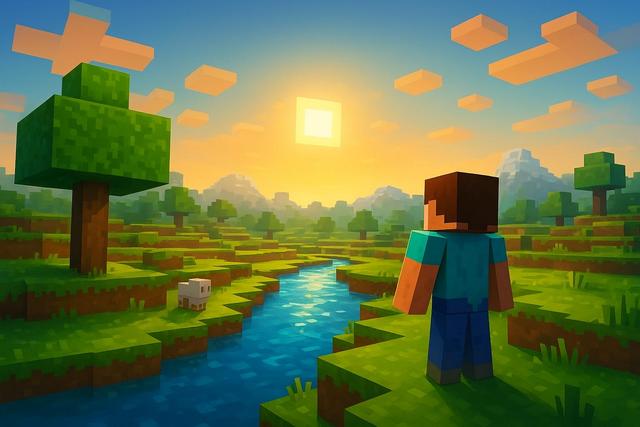
Free shaders for Minecraft completely transform the game's appearance. With them, you can enjoy realistic lighting, dynamic shadows, and impressive reflections. However, not all shaders are created equal. Some focus on performance, while others aim for ultra-realistic rendering. In this article, discover our selection of the 10 best free shaders for Minecraft, optimized for different PCs and play styles.
For easy access, you can download the latest version of Roblox here.
Why Install a Free Shader for Minecraft?
Minecraft captivates players with its gameplay, yet its graphics remain simple. Shaders enhance lighting, water, and shadows, making the world more immersive. Thanks to these visual improvements, each biome gains depth and realism.
A free Minecraft shader brings several advantages:
- More natural dynamic lighting
- Realistic reflections on water
- Detailed and moving shadows
- Improved skies and sunsets
- More immersive atmospheric effects
However, you need to install OptiFine or Iris Shaders to use them. These tools make it easier to activate shaders and optimize performance.
1. BSL Shaders
BSL Shaders is a reference among free shaders for Minecraft. It offers soft lighting, balanced colors, and detailed shadows. Additionally, it provides many customizable settings.
This shader is suitable for players who want a realistic rendering without sacrificing too many FPS. It runs well on mid-range setups as it remains optimized.
2. Complementary Shaders
Complementary Shaders enhances BSL while maintaining excellent performance. It adds advanced lighting effects while remaining smooth.
This free Minecraft shader comes in two versions: one focused on performance and another on quality. Thus, you can easily adjust the settings to fit your PC.
3. Sildur’s Vibrant Shaders
Sildur’s Vibrant Shaders focuses on intense, vibrant colors. Sunsets become spectacular, and water appears more realistic.
The shader offers several quality levels, allowing even modest PCs to enjoy it. This flexibility explains its popularity.
4. SEUS Renewed
SEUS Renewed provides a very realistic rendering. Shadows are deep, and reflections are precise. However, it requires a more powerful configuration.
This free shader for Minecraft is suitable for players looking for a cinematic effect. Dynamic lighting effects enhance immersion, reacting to light sources.
5. Chocapic13’s Shaders
Chocapic13’s Shaders has been around for several years. It offers different versions tailored to every type of PC.
This shader stands out for its balance between performance and quality. Moreover, it works well on laptops.
6. KUDA Shaders
KUDA Shaders subtly enhances Minecraft's graphics. Shadows and water gain finesse while colors remain natural.
This free shader is appealing to players who want an improved rendering without excessive effects. It is simple to configure, making it ideal for beginners.
7. Nostalgia Shaders
Nostalgia Shaders modernizes Minecraft while keeping its original style. It avoids overly realistic effects, respecting the game's aesthetics.
Performance remains stable, making it popular among players using mid-range PCs. This choice reassures those looking to enhance graphics without completely changing the atmosphere.
8. Oceano Shaders
Oceano Shaders focuses on landscapes. Water, sky, and clouds receive special attention.
This shader transforms explorations into real postcards. However, it consumes more resources due to its volumetric effects.
9. MakeUp – Ultra Fast Shaders
MakeUp – Ultra Fast Shaders targets low-end setups. It optimizes performance while offering convincing visual effects.
This free Minecraft shader works perfectly on entry-level PCs. It provides a good compromise if you want to enhance graphics without lag.
10. ProjectLUMA Shaders
ProjectLUMA Shaders takes inspiration from SEUS while remaining lighter. It enhances reflections, colors, and overall lighting.
This shader offers a cinematic rendering as the light appears more natural. However, it is more accessible than some highly demanding shaders.
Quick Comparison of the Best Free Minecraft Shaders
| Shader | Realism | Performance | Ideal For |
|---|---|---|---|
| BSL | High | Good | Mid-range PCs |
| Complementary | Very High | Very Good | All PC types |
| Sildur’s | Colorful | Adaptable | Modest to powerful PCs |
| SEUS Renewed | Very Realistic | Average | Powerful PCs |
| MakeUp Ultra Fast | Moderate | Excellent | Low-end setups |
This table helps you quickly compare free Minecraft shaders based on your needs.
How to Install a Free Shader on Minecraft?
Installation is simple if you follow these steps:
- Download and install OptiFine or Iris.
- Launch Minecraft with the corresponding profile.
- Open the graphics options.
- Access the "Shaders" menu.
- Import the downloaded shader file.
Then, activate the desired shader. Adjust the graphics settings as needed, as each setup varies.
How to Choose the Best Free Shader for Minecraft?
First, you need to check your PC's power. A very realistic shader can significantly reduce FPS. Thus, adapt your choice to your graphics card and processor.
Next, define your priority. Do you want a realistic, colorful rendering or one that stays true to the original style? Each shader meets a specific need.
Finally, test multiple options. Free shaders for Minecraft allow this flexibility since they cost nothing.
Optimizing Performance with a Minecraft Shader
Even with a demanding shader, you can improve performance. Reduce the render distance as it greatly influences the frame rate. Also, lower the quality of shadows and reflections.
Additionally, enable OptiFine optimization options to keep the game smooth. Close background applications as they consume unnecessary resources.
Conclusion
Free shaders for Minecraft radically transform your gaming experience. They enhance lighting, water, and landscapes while remaining accessible. However, you must choose a shader suitable for your configuration.
BSL, Complementary, and Sildur’s are among the most balanced options. MakeUp Ultra Fast is better suited for low-end PCs, while SEUS Renewed is aimed at powerful machines.
With this selection of the 10 best free shaders for Minecraft, you can now beautify your worlds and enjoy a spectacular rendering. Test several, as each player has their visual preferences and unique style.


